rancher/dashboard #19025 · multi-IdP

Multi-IdP Login Page Audit

Every login message the page can show, captured against every auth provider type, one and two configs of each, mixed LDAP setups, all 34 configs at once, local login hidden, a custom login error, and first login.

Rancher v2.16.0-c49dad3-head (Prime) Dashboard releases.rancher.com/dashboard/latest Viewport 1440×900, light theme Captured 2026-10-21

Findings

High

A tall banner overlaps the heading and slides under the form

all providers · tall content

When the panel is taller than the window, the error banner is squeezed into 70px. The "Login" heading is drawn over its top and the Username field covers its last line. Seen with all 34 configs at 1440×900 and 1366×768, whenever the banner wraps past about three lines (long backend errors, or a custom login error plus any error).

  • .login-messages--hasContent { min-height: 70px } replaces the flex item's default min-height: auto, so the panel's flex column is free to shrink it to 70px.
  • The container is align-items: center, so the clipped banner overflows evenly upward and downward.
  • Fix: flex-shrink: 0 on .login-messages. It belongs with #19025, which touches the same container.
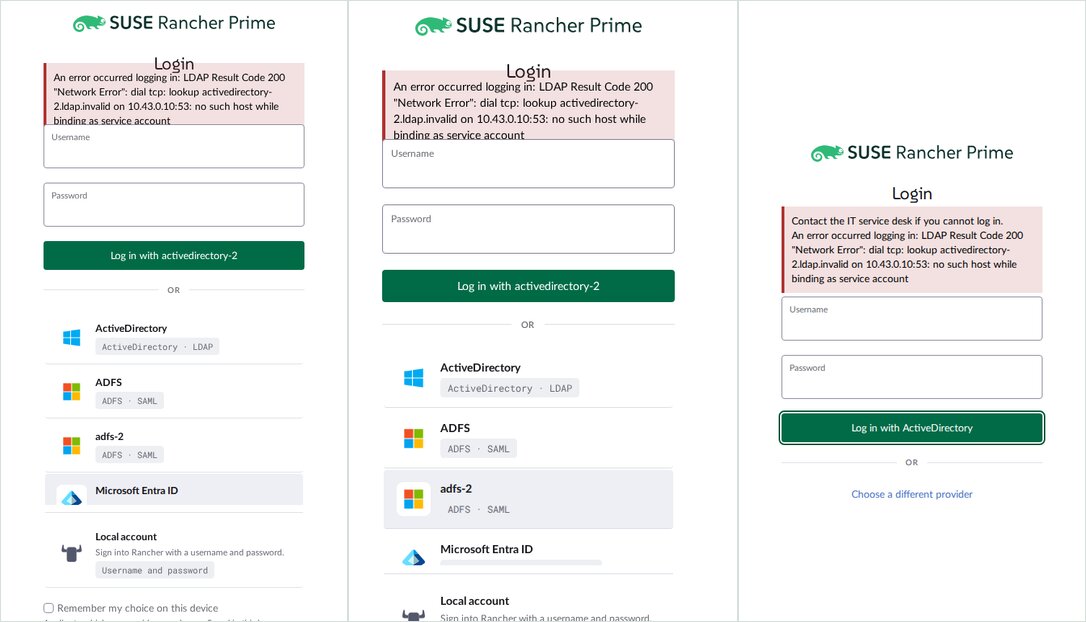
Three login panels where the error banner overlaps the Login heading and is cut off by the Username field
All 34 at 1440×900 · all 34 at 1366×768 · two ActiveDirectory configs with a custom login error
High

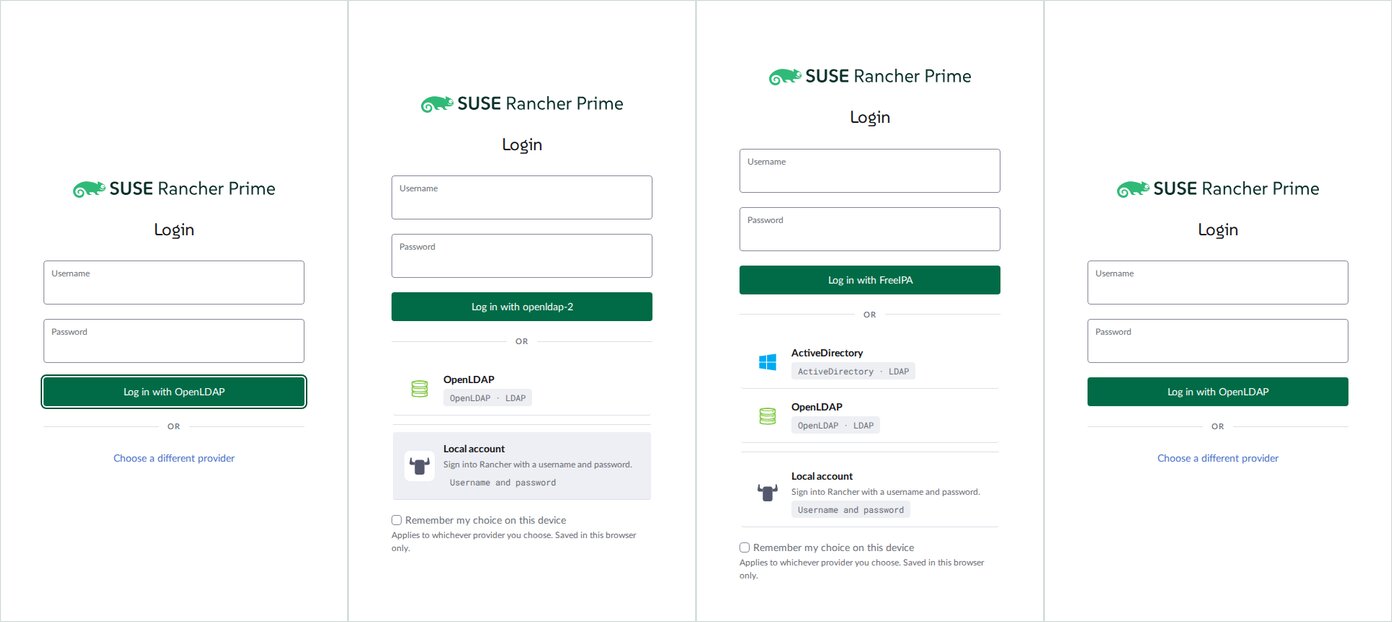
With several LDAP configs, "Choose a different provider" switches provider for you

ActiveDirectory · OpenLDAP · FreeIPA

Clicking the link expands the list and also moves the form to the first other option in sort order. That option then leaves the list. Picking from the list collapses it again. The same config therefore renders in two different layouts depending on how the user reached it, and with two configs the page bounces between them.

OpenLDAP, list hidden ──"Choose a different provider"──▶ openldap-2, list shown (OpenLDAP, Local) ▲ │ └──────────────────── pick "OpenLDAP" in the list ─────────────┘
  • showProviderList is hasProviderList && (!isCredentialForm || listExpanded), so the list is only hidden for LDAP and local.
  • expandProviderList() changes selectedProviderId and clears "Remember my choice". selectProvider() sets listExpanded = false.
  • The form above changes only its button label ("Log in with openldap-2"), so the switch is easy to miss. The user can sign in against a server they never chose.
  • The only way to see "openldap-2, list hidden" is for openldap-2 to be the remembered choice.
  • Suggested direction: let expanding reveal the list without changing the selection, and keep the list open after a pick, as it already is for SSO.
Login panels showing OpenLDAP collapsed, openldap-2 expanded, FreeIPA expanded from a mixed setup, and OpenLDAP collapsed after picking it
Two OpenLDAP: opens on OpenLDAP · after the link it is openldap-2 · mixed LDAP: the link jumps to FreeIPA · picking OpenLDAP hides the list again
Medium

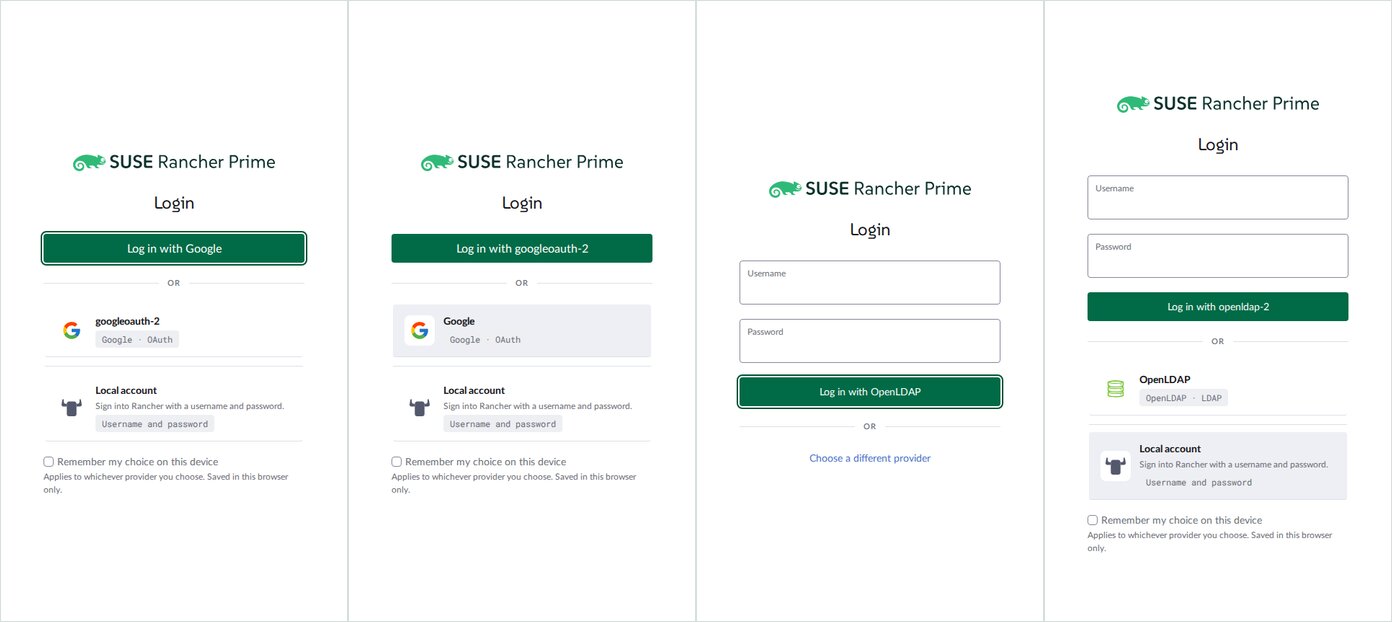
SSO and LDAP lists behave differently

two configs of one type

With two SSO configs, the list is visible from the start and stays put after a pick; the button above names the chosen config. With two LDAP configs, the list is hidden behind a link and the layout changes as described above. Both share one component and one list design, so users moving between them see two different interaction models.

Google with list visible before and after choosing googleoauth-2, beside OpenLDAP with a link and then an expanded list
Two Google: opens with list · after picking googleoauth-2 · Two OpenLDAP: opens with link · after the link
Medium

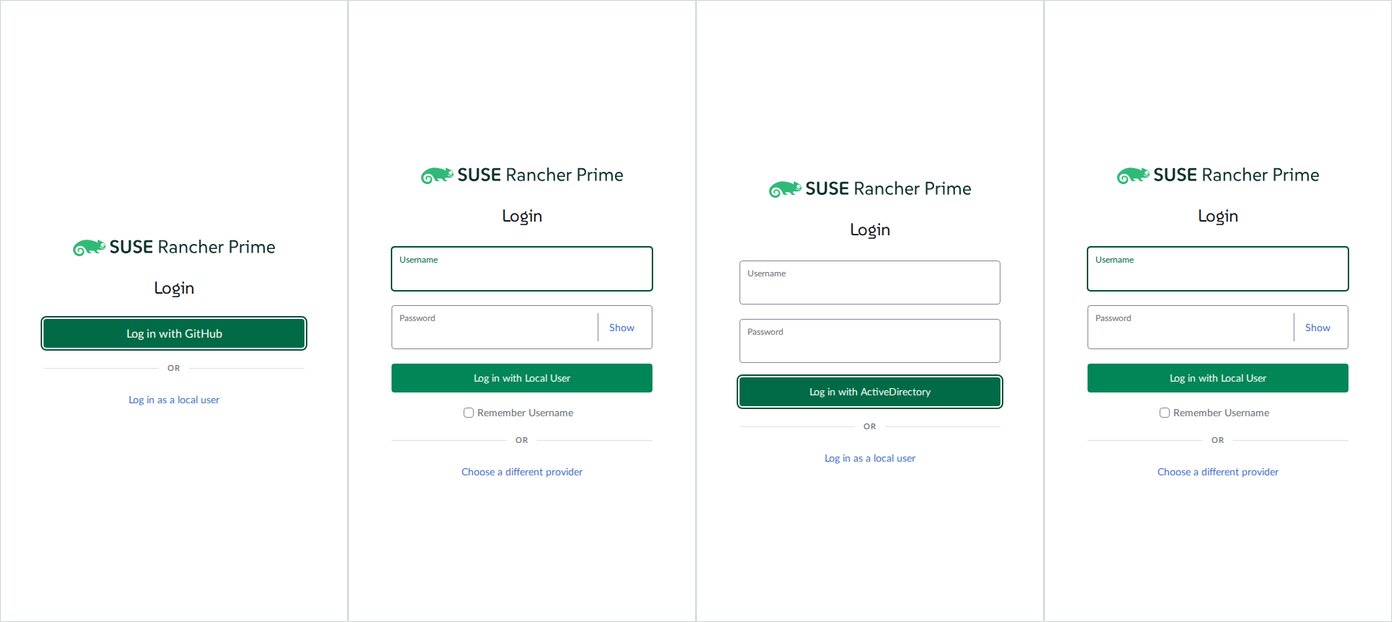
One LDAP plus local: the link label promises a choice and the swap is near-invisible

one external provider

With one external provider and local, "Choose a different provider" calls toggleLocal(), a straight swap with no list. For SSO the panel visibly changes from one button to a form. For LDAP it goes from one username/password form to another. Only the button label changes, plus the local form's "Show" toggle and "Remember Username".

  • Name the destination instead, e.g. "Log in with ActiveDirectory", mirroring "Log in as a local user". Keep "Choose a different provider" for when there is a list.
  • Give credential forms something besides the button label that says which provider they belong to.
GitHub button and local form, then ActiveDirectory form and local form
GitHub · after the link · ActiveDirectory · after the link
Medium

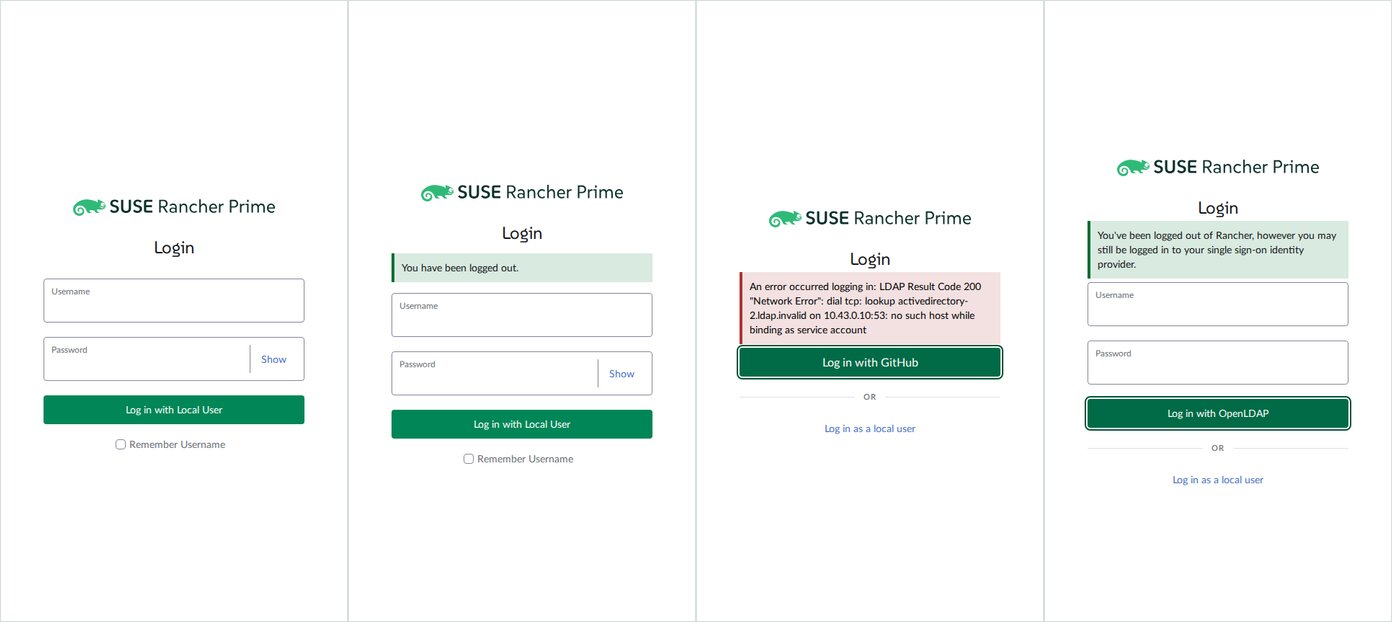
#19025: banners sit 5px above the form

every provider type

The form gets mt-30 only when there is no message. With any banner, the form loses that margin and the banner's own 5px margin is the only gap. This applies to every message and every provider type: the SSO button, the LDAP form and the local form all sit 5px under the banner.

Local login without message, with logged out banner, GitHub with long error, OpenLDAP with SSO logout message
No message (30px gap) · logged out · GitHub with a long error · OpenLDAP after SSO logout
Low

Smaller inconsistencies

  • Focus. An open LDAP form focuses the "Log in with …" button, not Username (mixins/login.js focuses $refs.btn). The local form focuses Username.
  • Password field. Local uses Password with a Show toggle; LDAP uses a plain LabeledInput type="password". Only local offers "Remember Username".
  • Names. Second configs show their raw id (activedirectory-2, okta-2). /v1-public/authproviders does not return description even when the authconfig has one (checked by setting it on github-2), so the list's description line never appears for external providers.
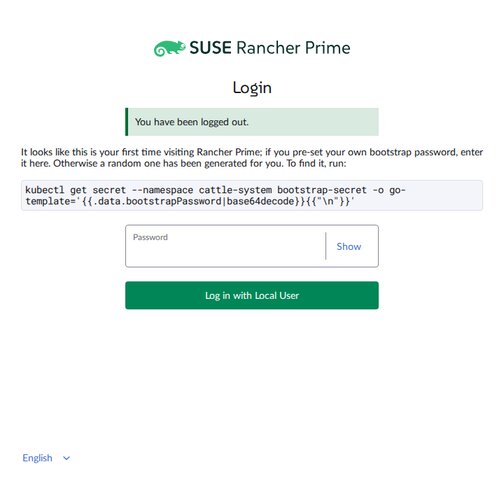
  • First login. The bootstrap-password box spans the whole panel (about 660px) instead of the 362px column, and gets no top margin when a banner shows.
  • Hover after expanding. The row under the pointer is highlighted once the list opens beneath it, which reads as a selection in screenshots.
First login box wider than the login column
First login after logout
Info

Backend notes from setting up the configs

  • An enabled googleOauthConfig whose credential has no redirect_uris makes /v1-public/authproviders return 500, so the login page fails for every provider. Only reachable by editing the authconfig directly; the UI form validates the credential.
  • Disabling a config resets it: LDAP servers and the Google credential are cleared, and the webhook then refuses to re-enable LDAP without servers.
  • The page has no warning or info banners. "All permutations" here means the success and error variants plus the first-login box.

Messages the page can show

The login page shows at most one banner. Error wins over logged out, logged out wins over timed out. There is no warning or info variant: the page only produces success and error banners. A custom ui-banners.loginError message is prepended to the error text, not shown as its own banner.

PermutationQueryVariantText
No message———
Logged out?logged-outsuccessYou have been logged out.
Logged out: session idle?logged-out&is-session-idlesuccessYou've been logged out of Rancher because your session has expired…
Logged out: SLO?logged-out&is-slosuccessYou've been logged out of Rancher and from your single sign-on identity provider.
Logged out: SSO?logged-out&is-ssosuccessYou've been logged out of Rancher, however you may still be logged in to your single sign-on identity provider.
Timed out?timed-outerrorLog in again to continue.
err=client / server?err=clienterrorAn error occurred logging in. Please try again.
err=client_unauthorized?err=client_unauthorizederrorInvalid username or password. Please try again.
err=nonce?err=nonceerrorInvalid response received to login request. Please try again.
err=user_unauthorized?err=user_unauthorizederrorYou are not authorized to use this system.
Specific error?err=<text>errorAn error occurred logging in: <text> (captured short and with a long LDAP error)
SLO logout error?is-slo&err=<text>errorAn error occurred logging out: <text>
Error + logged out?logged-out&err=servererrorError only; the logged-out banner is dropped.
First loginfirst-login=trueinfo boxBootstrap password instructions, local only (not a banner).